Wednesday, June 5, 2013

7 Best Launcher Apps Available for Android Devices

Are you getting bored with the stock look of your android phone? Why not go ahead and change the launcher and get a better UI matching your taste.
If you still not sure that what we are talking about then launchers are apps that change the home UI of your Android devices. They allow you to change icons, animations, App drawer settings, add more home screens, hide apps, allows wallpaper sliding while viewing different home screens, 3D effects, transition effects, themes etc.
Below we’re going to list some of the  best launchers or home replacements available in Google Play.

Nova Launcher

Nova launcher is by far the best launcher or home replacement we’ve used so far. It’s very stable and simple.
But there are few cons, it doesn’t have variety of features as we’ve seen in other competitors. There is limited amount of transition effect in it, but it’s stability and performance leaves every other launcher behind.
Nova launcher is quite similar to the stock launcher of ICS, But it’s a great change if you are coming from Touchwiz, HTC sense etc. Nova launcher brings many themes that can be found in Google Play.
Nova launcher has paid version and free versions. Paid version costs $4.00 that adds some premium features.
Nova launcher 2 7 Best Launcher Apps Available for Android DevicesNova launcher 3 7 Best Launcher Apps Available for Android DevicesNova launcher 1 7 Best Launcher Apps Available for Android Devices

GO Launcher EX

GO Launcher EX stands at a great place of respect in Google Play, that’s probably because of the large number of themes widgets and some side apps that can customize the device even more. It has tons of features that’ll surprise you when you go through its settings.
The theme collection is huge and most of them are free but some are paid. When you download the launcher it comes with a market, From there you can download add-ons, widgets, go locker, themes etc.
But this launcher doesn’t offer that much of stability nor the performance. We experienced that device gets really laggy and slow if you’re using a mid end or low end android phone. Having said this, we don’t mean that launcher is bad, in fact you won’t notice that lag and slow performance in high end android phones.
GO Launcher EX is free in Google Play.
Go launcher ex 3 7 Best Launcher Apps Available for Android DevicesGo launcher ex 1 7 Best Launcher Apps Available for Android DevicesGo launcher ex 2 7 Best Launcher Apps Available for Android Devices

Vire Launcher

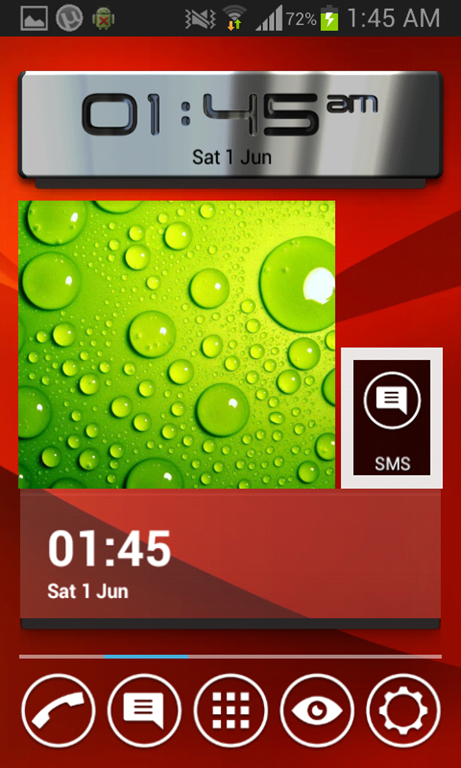
Vire is pretty fancy looking launcher. It comes with this very catchy 3D effect. If you tilt the device you can notice the glass reflection on vire widgets and other animation while using the launcher.
The launcher runs quite smooth and performance is good as well. The features in the setting menu are limited but we appreciate how simple and glassy interface it has. The app drawer seemed a little blurry even though the transition effect was pleasing but vire launcher needs more improvement to stand in the competition.
Vire launcher 1 thumb 7 Best Launcher Apps Available for Android DevicesVire launcher 2 7 Best Launcher Apps Available for Android DevicesVire launcher 3 7 Best Launcher Apps Available for Android Devices

Smart Launcher

Smart launcher is for people who find normal android launchers complex and they want something different and easy to use and want more organized launcher. The UI here is very simple, clean, very easy to use and apps are placed in categories. Launcher is pretty stable, light and snappy.
Biggest con is that you can’t place widgets on home screen.
Smart launcher 1 7 Best Launcher Apps Available for Android DevicesSmart launcher 2 7 Best Launcher Apps Available for Android DevicesSmart launcher 3 7 Best Launcher Apps Available for Android Devices

Next Launcher 3D

Next launcher 3D is Super customizable launcher we’ve ever used. It’s pretty fancy looking, snappy and very stable. Even the icons here show animations. This launcher is probably the most highly polished launcher available in the market.
Even the smallest things are kept in mind and shows something different, something unique than others. The only con is that it comes with is its ridiculously expensive price tag of $15.99.
Next 2 7 Best Launcher Apps Available for Android DevicesNext 3 7 Best Launcher Apps Available for Android DevicesNext 1 7 Best Launcher Apps Available for Android Devices

Splay Launcher

Splay launcher is very gorgeous looking piece of the art. The launcher has categories and sub categories from where you can open apps.
It’s hard to get used to it and sometimes things don’t work that well. But this launcher is unique, It doesn’t make your device look like an android. The graphics are great but they need little polishing. it’s snappy and very stable.
You can’t use widgets on this launcher as well, but instead of using widgets you can have shortcuts.
Splay 2 7 Best Launcher Apps Available for Android DevicesSplay 3 7 Best Launcher Apps Available for Android DevicesSplay 1 7 Best Launcher Apps Available for Android Devices

Launcher 8

If you’re a fan of the UI of windows phone 8 and you want to have those animated live tiles that smoothness that looks and feel than Launcher 8 is for you.
It’s not exactly the same thing as windows phone 8 but It feels quite similar. you can install different themes on it and make it much more customizable.
This launcher also comes with windows phone lock screen where you have to swipe up to unlock. Launcher 8 is very snappy and is stable as well but while using this launcher we noticed significant battery loss, it tends to eat more battery.
Windows 8 launcher 3 7 Best Launcher Apps Available for Android DevicesWindows launcher 8 2 7 Best Launcher Apps Available for Android DevicesWindows 8 launcher 1 7 Best Launcher Apps Available for Android Devices

Tuesday, June 4, 2013

How to backup SMS in Qmobile NOIR?

Many a times you need to change your mobile phone or have an urge to upgrade it, the most problematic thing comes when you want to back up your SMS which you don’t want to lose.
There are a number of freely available apps on Google Play that will help you backup your SMS and restore them as you like. We will be covering two different apps with two different ways of saving SMS.

Backup SMS via Gmail

The easiest way to save SMS is via Gmail using the software SMS Backup+ by Jan Berkel. You will require an internet connection for backing up your SMS. Even though you can use your mobile internet for backup too but if you have a lot of SMS, it will take a lot of time and may use up a lot of your balance in the process.
This app saves all your SMS on your Gmail account which you can also view in the folder named SMS.
1.   Download and install the application
How to backup SMS in Qmobile NOIR?
2.   Touch on the back up button
How to backup SMS in Qmobile NOIR?
3.   Enter Gmail account info
How to backup SMS in Qmobile NOIR?

How to backup SMS in Qmobile NOIR?
4.   After Gmail account addition, touch the backup button again
5.   Wait and relax while your SMS are being uploaded

Restore

Similarly to restore SMS, just click on Restore button

Backup SMS via xml file

If you don’t want to use the internet or your Gmail account for saving your SMS, there is another procedure. The App named Backup and Restore by Ritesh Sahu saves all your SMS in an xml file on to your mobile memory which you can later use.
1.   Download and install the application
How to backup SMS in Qmobile NOIR?
2.   Touch “Backup” and select the location of file
How to backup SMS in Qmobile NOIR?
3.   Write down name of the file
How to backup SMS in Qmobile NOIR?
4.   Wait and relax while you SMS are being saved in the xml file
5.   Connect mobile to computer and copy the xml file for backup

Restore

1.   Touch the button Restore
2.   Select the backup file to restore messages
How to backup SMS in Qmobile NOIR?
3.   Restore all messages or those from any date
How to backup SMS in Qmobile NOIR?
4.   Wait and relax

8.0 and 10.1 inch version of Galaxy Tab 3 launched by Samsung

After the launch of its 7 inch version of the Galaxy Tab 3, Samsung has now announced bigger versions of the Tab 3 in the sizes of 8.0 inch and 10.1 inches.
The Samsung Galaxy Tab 3 8.0 offers a wide 8.0 inch display with 1280 x 800 pixel resolution and is powered by a 1.5 GHz dual core processor supported by 1.5 GB of RAM. It comes with a 5 megapixel camera on the back and 1.3 megapixel on the front. It comes with two variants of internal memory of 16 and 32 GB both of which can be expanded via microSD card. In terms of connectivity the Galaxy Tab 3 8.0 has LTE, Wi-Fi, GPS, Bluetooth and has a 4,450mAh battery. OS being used is the Android 4.2 Jelly Bean.
8.0 and 10.1 inch version of Galaxy Tab 3 launched by Samsung
Samsung Galaxy Tab 3 10.1 is quite similar in specifications with 1280 x 800 pixels spread over a wider area of 10.1 inches (this would mean a lower pixel intensity). The big brother does have some aces up its sleeve as it is powered with a 1.6 GHz dual core processor and 6,800 mAh battery. Though surprisingly it is coupled with a lower resolution back camera of 3 megapixel and 1 GB RAM. Moreover the on-screen buttons have completely been left out in favor of the physical buttons below.
8.0 and 10.1 inch version of Galaxy Tab 3 launched by Samsung

Facebook users unable to send messages for 90 minutes

Facebook users unable to send messages for 90 minutesThe most popular social media networking site, Facebook faced a 90 minute downtime in its messaging services in some areas. It was reported that users were unable to send or receive messages on Facebook for about one and a half hours in areas of California, Texas, and New York. Facebook chat came back to its original form at 7:30 PST.
When some mobile users tried to open their Messages from the icon on top, inbox of messages which is normally filled with all your conversation histories of the past, appeared empty. Users received the message “Down For Maintenance: Sorry, messages are temporarily unavailable. Please try again later” when they tried to send messages.
Though Facebook claims that only a fraction of the users was effected by this incident, it paints a serious question mark on the sites reliability. With the social media giant trying to counter Google in many aspects of web services, it would really have to step up its game if it wants to retain existing and gain more uses especially after Google launched its Hangouts unified chat system.

Altimo lays down arms as offer for Orascom Telecom fails

orascom2Russian billionaire Mikhail Fridman’s Altimo declared that he had no further plans for giving out a new offer to buy minority shares in Orascom Telecom as Egypt’s regulator had once rejected the company’s attempt to reopen tender.
51.9 percent of shares of Orascom are owned by VimpelCom, which, in turn is 47.85 percent owned by Altimo. Orascom has mobile businesses in Canada, Pakistan, Algeria and Bangladesh.
Altimo had offered to buy out minority shareholders of Orascom in a deal estimated to be $1.8 billion but the minority shareholders did not accept the deal within the deadline. Only 15.9 percent of the minority shareholders had accepted to sell whereas 26.6 percent are required to close the deal.
Following the refusal of most of the minority shareholder, Altimo asked the Egyptian Financial Supervisory Authority (EFSA) to put aside the 26.6 percent requirement but EFSA rejected their request.