Thursday, June 6, 2013

AMD aiming to produce chips for Android and Chrome tablets

AMD aiming to produce chips for Android and Chrome tabletsAdvanced Micro Devices (AMD) seems to have opened its eyes to the wide range of possibilities offered by operating systems other than Windows 8 as it announced that it will be designing chips based on the x86 and ARM architecture to support Android and Chrome on tablets. As per last year AMD had said that it would only be focusing on developing tablet chips that would support Windows 8.
Lisa Su, senior vice president and general manager of global business units at AMD said at the Computex trade show that though the company was very committed to Windows 8 with it being a great OS but the market of Android and Chrome based tablets was also quite lucrative.
Windows 8 has not been that much successful in its tablets operations as of yet and a few Windows based tablet using AMD chips Z-10 and Z-60 did not sale very well.
With Intel also eying the tablets market with its Silvermont based Bay Trail SoC chips, AMD has done well to make its mark in the market.
AMD will be featuring its “Temash” chips A4 and A6 in the latest Windows based tablets in second half of this year. Temash chips consume only 3.9 watts, offer a battery time of up to 8 hours and are expected to rival Intel’s Bay Trail tablet chips.

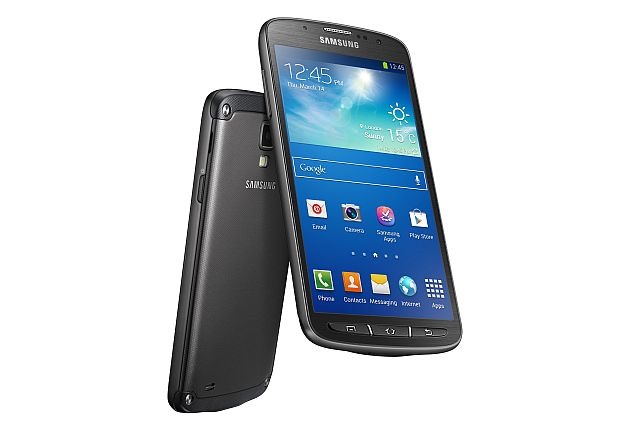
Samsung Unveils Galaxy S4 Active; Water Proof S4 Variant

clip image001 thumb Samsung Unveils Galaxy S4 Active; Water Proof S4 Variant
Putting weight to all rounds of rumors, Samsung has now announced Galaxy S4 Active that is almost identical to Galaxy S4, but with added attribute of being a water proof device.
This time, following the footsteps of Sony XPERIA, Samsung made this device IP67 certified (dust- and water-proof), enabling users to submerge it for up to 30 minutes at a depth of one meter.
Measuring in at 9.1mm thick and 151g in weight, Galaxy S4 active features 5-inch full HD (1920×1080 pixels resolution) TFT LCD screen that has a pixel density of 443 PPI 1080p display.
Running on Android 4.2.2, the latest iteration of the operating system, Samsung embedded this device with 1.9GHz quad-core processor with 16GB internal storage that is expandable by another 64GB via microSD card slot inside a fully waterproof case.
On camera front, it sports an 8-megapixel rear camera with LED flash and a 2-megapixel front facing camera. However, the volume key located on the side of the phone can be used as a camera key, enabling users to simply and swiftly open the camera application to capture photo and video right away. Moreover, the camera alters into a powerful LED flash light to support dim-light and night-time activities with a long press of the volume key.
Another good aspect for camera lovers is that it also embraced with Aqua Mode feature for taking snaps underwater. With a water-resistant earphone jack, one can use headphones even throughout wet conditions.
Connectivity options include, Wi-Fi direct, Bluetooth 4.0, NFC and LTE as well as it also sports an Infrared blaster along with battery capacity of 2600mAh. This device has an accelerometer, proximity sensor, a gyro sensor, digital compass, barometer, gesture sensor, finger hovering sensor and a light sensor.
Other software tweaks include Group Play to share music, photos, documents and games together along with Trip Advisor-powered S Travel, S Translator etc.
However, this device will be fully showcased at Samsung’s Premiere event in London on June 20. Coming to its availability, it has been predicting that the GALAXY S4 Active will start selling sometime this summer initially in U.S. and Sweden and then will move to other regions.
This device will be presented in three different color options, including Urban Grey, Dive Blue and Orange Flare. However, price tag has been keeping wrapped.
Here are the key specs for Galaxy S4 Active:
  • 5-inch full HD (1920×1080 pixels resolution) TFT LCD screen
  • 1.9GHz quad-core processor
  • 2GB RAM
  • 16GB internal storage expandable up to 64GB via microSD card
  • 8-megapixel rear camera
  • 2-megapixel front facing camera
  • Android 4.2 Jelly Bean
  • 2600mAh battery

Wednesday, June 5, 2013

LG Introduces Nexus 4 in White

LG NEXUS4 WHITE LG Introduces Nexus 4 in White
LG Electronics (LG) announced the launch of Nexus 4 White, the newest edition of the popular smartphone developed in collaboration with Google.
Nexus 4 White features the same stellar Android experience as the original Nexus 4, combining LG’s sophisticated hardware design and popular Google Services such as Google Now and Photosphere for an outstanding overall user experience.
“Nexus 4 set the standard for Android 4.2 Jelly Bean smartphones,” said Dr. Jong-seok Park, president and CEO of LG Mobile Communications Company. “Nexus 4 White delivers the same Google experience to consumers in a stylish and attractive color option.”
Nexus 4 White comes with the superb 4.7-inch 1280-by-768 True HD IPS Plus display (320ppi) supported by Zerogap Touch technology. At its heart is the high performing Qualcomm Snapdragon™ S4 Pro processor and 2GB of RAM.
Starting in Hong Kong on May 29, Nexus 4 White will roll out globally in select markets in Asia, North America, Europe and the Middle East over the next several weeks.

7 Best Launcher Apps Available for Android Devices

Are you getting bored with the stock look of your android phone? Why not go ahead and change the launcher and get a better UI matching your taste.
If you still not sure that what we are talking about then launchers are apps that change the home UI of your Android devices. They allow you to change icons, animations, App drawer settings, add more home screens, hide apps, allows wallpaper sliding while viewing different home screens, 3D effects, transition effects, themes etc.
Below we’re going to list some of the  best launchers or home replacements available in Google Play.

Nova Launcher

Nova launcher is by far the best launcher or home replacement we’ve used so far. It’s very stable and simple.
But there are few cons, it doesn’t have variety of features as we’ve seen in other competitors. There is limited amount of transition effect in it, but it’s stability and performance leaves every other launcher behind.
Nova launcher is quite similar to the stock launcher of ICS, But it’s a great change if you are coming from Touchwiz, HTC sense etc. Nova launcher brings many themes that can be found in Google Play.
Nova launcher has paid version and free versions. Paid version costs $4.00 that adds some premium features.
Nova launcher 2 7 Best Launcher Apps Available for Android DevicesNova launcher 3 7 Best Launcher Apps Available for Android DevicesNova launcher 1 7 Best Launcher Apps Available for Android Devices

GO Launcher EX

GO Launcher EX stands at a great place of respect in Google Play, that’s probably because of the large number of themes widgets and some side apps that can customize the device even more. It has tons of features that’ll surprise you when you go through its settings.
The theme collection is huge and most of them are free but some are paid. When you download the launcher it comes with a market, From there you can download add-ons, widgets, go locker, themes etc.
But this launcher doesn’t offer that much of stability nor the performance. We experienced that device gets really laggy and slow if you’re using a mid end or low end android phone. Having said this, we don’t mean that launcher is bad, in fact you won’t notice that lag and slow performance in high end android phones.
GO Launcher EX is free in Google Play.
Go launcher ex 3 7 Best Launcher Apps Available for Android DevicesGo launcher ex 1 7 Best Launcher Apps Available for Android DevicesGo launcher ex 2 7 Best Launcher Apps Available for Android Devices

Vire Launcher

Vire is pretty fancy looking launcher. It comes with this very catchy 3D effect. If you tilt the device you can notice the glass reflection on vire widgets and other animation while using the launcher.
The launcher runs quite smooth and performance is good as well. The features in the setting menu are limited but we appreciate how simple and glassy interface it has. The app drawer seemed a little blurry even though the transition effect was pleasing but vire launcher needs more improvement to stand in the competition.
Vire launcher 1 thumb 7 Best Launcher Apps Available for Android DevicesVire launcher 2 7 Best Launcher Apps Available for Android DevicesVire launcher 3 7 Best Launcher Apps Available for Android Devices

Smart Launcher

Smart launcher is for people who find normal android launchers complex and they want something different and easy to use and want more organized launcher. The UI here is very simple, clean, very easy to use and apps are placed in categories. Launcher is pretty stable, light and snappy.
Biggest con is that you can’t place widgets on home screen.
Smart launcher 1 7 Best Launcher Apps Available for Android DevicesSmart launcher 2 7 Best Launcher Apps Available for Android DevicesSmart launcher 3 7 Best Launcher Apps Available for Android Devices

Next Launcher 3D

Next launcher 3D is Super customizable launcher we’ve ever used. It’s pretty fancy looking, snappy and very stable. Even the icons here show animations. This launcher is probably the most highly polished launcher available in the market.
Even the smallest things are kept in mind and shows something different, something unique than others. The only con is that it comes with is its ridiculously expensive price tag of $15.99.
Next 2 7 Best Launcher Apps Available for Android DevicesNext 3 7 Best Launcher Apps Available for Android DevicesNext 1 7 Best Launcher Apps Available for Android Devices

Splay Launcher

Splay launcher is very gorgeous looking piece of the art. The launcher has categories and sub categories from where you can open apps.
It’s hard to get used to it and sometimes things don’t work that well. But this launcher is unique, It doesn’t make your device look like an android. The graphics are great but they need little polishing. it’s snappy and very stable.
You can’t use widgets on this launcher as well, but instead of using widgets you can have shortcuts.
Splay 2 7 Best Launcher Apps Available for Android DevicesSplay 3 7 Best Launcher Apps Available for Android DevicesSplay 1 7 Best Launcher Apps Available for Android Devices

Launcher 8

If you’re a fan of the UI of windows phone 8 and you want to have those animated live tiles that smoothness that looks and feel than Launcher 8 is for you.
It’s not exactly the same thing as windows phone 8 but It feels quite similar. you can install different themes on it and make it much more customizable.
This launcher also comes with windows phone lock screen where you have to swipe up to unlock. Launcher 8 is very snappy and is stable as well but while using this launcher we noticed significant battery loss, it tends to eat more battery.
Windows 8 launcher 3 7 Best Launcher Apps Available for Android DevicesWindows launcher 8 2 7 Best Launcher Apps Available for Android DevicesWindows 8 launcher 1 7 Best Launcher Apps Available for Android Devices

Tuesday, June 4, 2013

How to backup SMS in Qmobile NOIR?

Many a times you need to change your mobile phone or have an urge to upgrade it, the most problematic thing comes when you want to back up your SMS which you don’t want to lose.
There are a number of freely available apps on Google Play that will help you backup your SMS and restore them as you like. We will be covering two different apps with two different ways of saving SMS.

Backup SMS via Gmail

The easiest way to save SMS is via Gmail using the software SMS Backup+ by Jan Berkel. You will require an internet connection for backing up your SMS. Even though you can use your mobile internet for backup too but if you have a lot of SMS, it will take a lot of time and may use up a lot of your balance in the process.
This app saves all your SMS on your Gmail account which you can also view in the folder named SMS.
1.   Download and install the application
How to backup SMS in Qmobile NOIR?
2.   Touch on the back up button
How to backup SMS in Qmobile NOIR?
3.   Enter Gmail account info
How to backup SMS in Qmobile NOIR?

How to backup SMS in Qmobile NOIR?
4.   After Gmail account addition, touch the backup button again
5.   Wait and relax while your SMS are being uploaded

Restore

Similarly to restore SMS, just click on Restore button

Backup SMS via xml file

If you don’t want to use the internet or your Gmail account for saving your SMS, there is another procedure. The App named Backup and Restore by Ritesh Sahu saves all your SMS in an xml file on to your mobile memory which you can later use.
1.   Download and install the application
How to backup SMS in Qmobile NOIR?
2.   Touch “Backup” and select the location of file
How to backup SMS in Qmobile NOIR?
3.   Write down name of the file
How to backup SMS in Qmobile NOIR?
4.   Wait and relax while you SMS are being saved in the xml file
5.   Connect mobile to computer and copy the xml file for backup

Restore

1.   Touch the button Restore
2.   Select the backup file to restore messages
How to backup SMS in Qmobile NOIR?
3.   Restore all messages or those from any date
How to backup SMS in Qmobile NOIR?
4.   Wait and relax